


Review management software exists to solve one problem: your team finishes the job, gets in the truck, and never asks for the review. The right tool takes that ask off a person’s memory and makes it happen automatically, every job, then pulls every review you get into one place so you can actually respond. This guide is what to look for when you shop for one, and how to tell a working system from a pretty dashboard.
Most of these platforms demo well. They all show you a clean inbox and a rising star count. The differences that matter only show up after you’ve run a few hundred jobs through them — whether the request actually fires on its own, whether it reaches customers by text, and whether you can reply to everything without living in five tabs. Here’s what separates a real one.
What review management software actually does
At its core, review management software does four things: it asks customers for reviews, collects the reviews you get across platforms, helps you respond to them, and puts your best ones to work as marketing. A good tool does all four without your team touching any of it. A weak one does one of them and calls itself a platform.
The reason you need software at all — instead of a person sending texts — is consistency. The company that asks every customer, every job beats the one that asks when someone remembers. That’s not a slogan; it’s the whole game. EcoStar Pest Control built 1,015 Google reviews from a single location by doing exactly this, in a market where most pest companies sit at 50 to 200 reviews. The software is what made “every job” possible.
The five things that actually matter
Ignore the feature grid. Five capabilities decide whether the tool works.
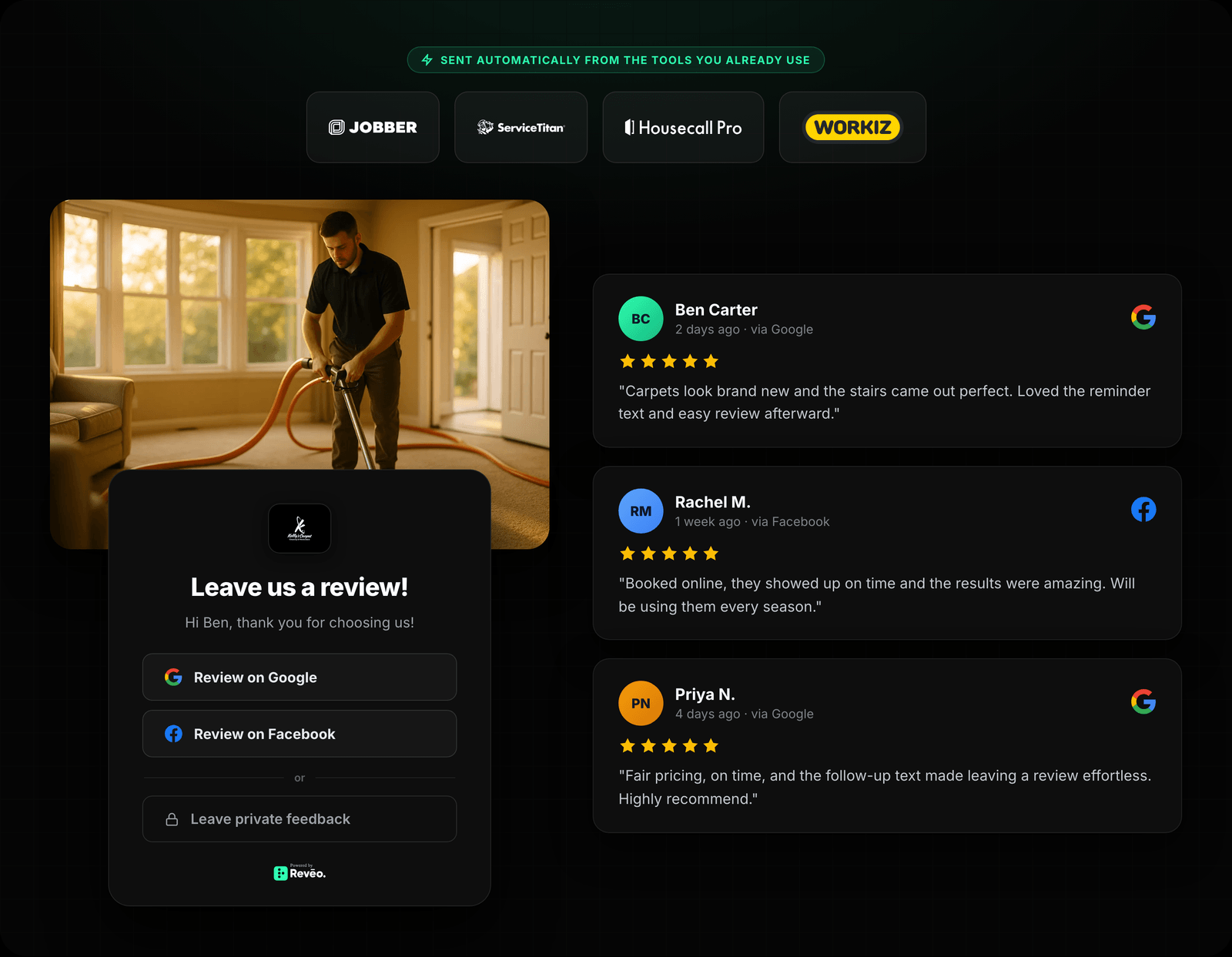
1. It fires from your field software, automatically. This is the one that matters most, and it’s where cheap tools cut corners. The request has to trigger when a job is marked complete in the system you already use — FieldRoutes, ServiceTitan, Jobber, Housecall Pro — so the text goes out while the customer is still standing in a cool house or a clean kitchen. If you have to remember to send the request, or upload a CSV every Friday, you’ve bought a slower version of the problem you had. Look for direct integrations first, then Zapier or webhooks as a fallback. If a vendor only offers “paste a link on your invoice,” keep looking.
2. It requests by text, not just email. Home-service customers answer texts and ignore email. A tool that leads with email invitations will quietly underperform and you’ll blame yourself. The automated request should go out as an SMS with a one-tap link, and it should be smart about timing — within the hour of job completion, not a batch blast the next morning that trips carrier spam filters.
3. One inbox for every platform. Your reviews land on Google, Facebook, and wherever else you’re listed. If replying means logging into three dashboards, you won’t do it. A real tool pulls everything into a single stream and lets you reply — with the reply posting back to the original platform. AI-drafted responses are genuinely useful here: they turn “reply to 40 reviews” from an afternoon into ten minutes. Just keep a human eye on them so they don’t read like a bot.
4. A path for the unhappy customer. The honest version of this feature: before a frustrated customer posts publicly, good software routes them to a private feedback form so you hear it first and get a chance to fix it. This is legitimate when it’s feedback routing — not review-gating, which Google prohibits and which will get you penalized. Ask the vendor directly how their negative-path works. If it “filters out” bad reviews, that’s a liability, not a feature. If it catches problems early and still lets anyone post, that’s the right design. Pair it with a real plan for responding to negative reviews that do land.
5. Your reviews go somewhere useful. Collecting reviews and letting them sit on Google is half a job. The tool should push your strongest reviews onto your website and social, and keep your Google Business Profile fed — because that profile is what customers actually see in local search.
What you can skip

Two things sales pages oversell. Sentiment dashboards with charts and word clouds look impressive and change nothing about your revenue — you already know if customers are happy. And a hundred integrations you’ll never use: what matters is that the tool connects to your field software cleanly, not that it lists 400 logos. Buy for the two integrations you need, not the 398 you don’t.
How to run the shortlist

Pick two or three tools and pressure-test them on the things that break in production, not the demo:
- Connect it to your actual field software during the trial. If the integration is flaky or “coming soon,” that’s your answer.
- Send yourself a request from a completed test job and time it. Did it arrive by text, within the hour, one tap to a five-star page?
- Ask what happens on a JWT rotation or a Google reconnect — the boring reliability stuff. Tools that drop your review sync silently are common; you find out weeks later when your count stops moving.
- Reply to a review from the inbox and confirm it actually posts back to Google.
If you want a broader look at the landscape before you narrow down, we keep an honest comparison of review platforms that names the tradeoffs.
What it looks like when it works
None of the results below came from an ad budget. They came from software that asked every customer, every job, without fail.
- Scoop Soldiers, a pet-waste franchise, hit 10× their review velocity in the first 30 days on Reveo. Co-owner Justin Thompson runs it across locations without a marketing team — the requests fire on their own.
- Romney Pest Control built 2,337 reviews, and when owner Greg Romney sold the company, that review density showed up in the valuation. Reputation on the balance sheet.
- Legion Pest Control reached 994 reviews in 24 months and mostly forgot about it — owner Brandon Jamison checks the dashboard once a week.
- BRD Pest Control saw its review velocity climb 3.4× in the first 17 days after switching on automated requests.
Different companies, same mechanic: the ask became a system instead of a chore someone might remember. That’s the entire difference between a business with 80 reviews and one with 1,000.
The bottom line
Buy the tool that fires automatically from your field software, sends by text, gives you one inbox, and handles the unhappy customer honestly. Skip the sentiment charts and the integration count. Then test the two or three finalists on real jobs before you sign anything — the demo won’t tell you what the fiftieth request does.
Want to see where your reviews, rating, and listings stand today before you shop? Run a free reputation scan — it takes a couple of minutes and gives you the baseline you’ll measure any tool against.