


Chapter 1: The Power of Google Reviews on Search Rankings
Google reviews have become the single most important form of social proof for local businesses. With 71% of all customer reviews living on Google, having a solid review strategy is no longer optional — it’s essential for survival in local search.
Whether you’re a home service provider, a retail shop, or a professional services firm, the reviews on your Google Business Profile directly influence how Google ranks you, how customers perceive you, and whether they choose you over a competitor.
What Are Google Reviews?
Google reviews are customer-submitted feedback that appears on your Google Business Profile (GBP). Customers rate their experience from 1 to 5 stars and can include written comments describing their interaction with your business.
Because Google is the largest search engine in the world — handling over 8.5 billion searches per day — these reviews carry enormous weight. They’re often the first thing a potential customer sees when they search for a business like yours, making them one of the most critical touchpoints in your customer acquisition funnel.
How Google Reviews Work
The process is straightforward: a customer visits your Google Business Profile, clicks “Write a review,” selects a star rating, and optionally writes a comment. Once submitted, the review is published on your profile and becomes visible across Google Search and Google Maps.
Businesses can facilitate this process by sharing a direct review link with customers — via email, text message, or even a QR code at their physical location. The easier you make it for customers to leave feedback, the more reviews you’ll collect.
Where Google Reviews Appear
Your Google reviews show up in three key locations across the Google ecosystem:
-
Google Knowledge Panel — Your digital business card that appears on the right side of search results. Displays your star rating, review count, and recent reviews prominently.
-
Google Maps — Reviews are visible when browsing Maps listings. Customers can sort and filter reviews directly within the Maps experience.
-
Google Search Results — Star ratings appear directly in search listings, including the coveted Local Map 3-Pack that dominates local search results.
Why Google Reviews Matter for Rankings
The data is clear: Google reviews are one of the most powerful ranking signals for local businesses. Here’s what the research tells us:
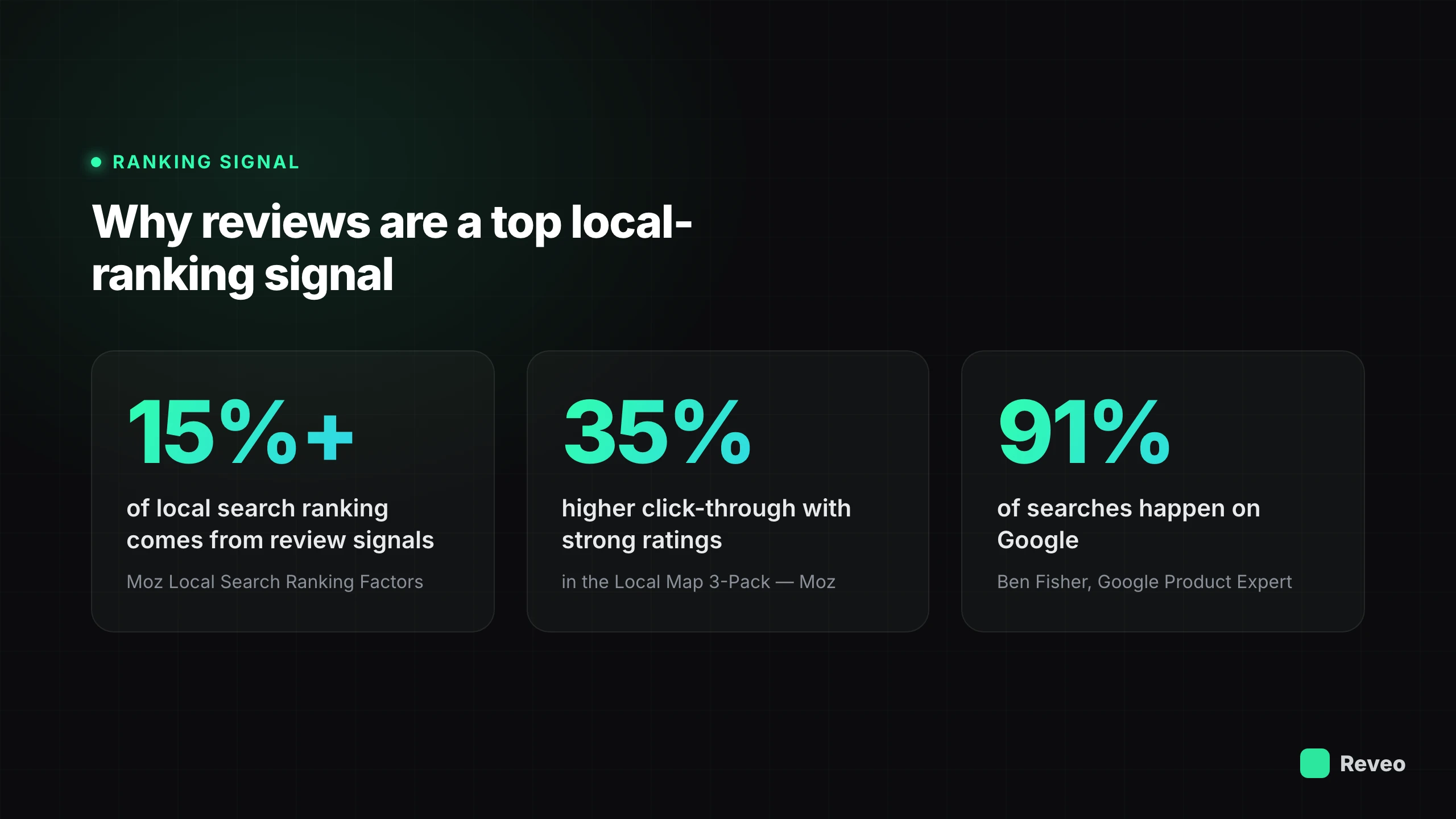
15%+ of local search ranking comes from review signals — Moz Local Search Ranking Factors
How Reviews Boost Search Rankings
Google reviews influence your search rankings through six distinct mechanisms:
-
Trust in Customer Feedback — Google’s algorithm interprets positive reviews as a trust signal. Businesses with consistently favorable feedback get higher positioning in local search results.
-
Relevant Keywords — When customers mention specific services in reviews, it helps Google understand what your business offers. This user-generated content acts as natural keyword optimization.
-
Quantity Matters — A high rating paired with a high volume of reviews carries significantly more weight than a perfect score with only a handful of reviews. Consistency and volume are key.
-
Trust and Credibility — Google’s own credibility transfers to well-reviewed businesses. When Google surfaces your business with strong reviews, it’s effectively endorsing your reliability.
-
Insights for Growth — Reviews provide candid, unfiltered feedback about what you’re doing well and where you can improve. This intelligence informs business strategy and service improvements.
-
Influence on Purchase Decisions — Reviews aren’t just ranking signals — they’re lead generation tools. Strong reviews convert searchers into customers, creating a virtuous cycle of growth.
Click-Through Rate Impact
Beyond rankings themselves, Google reviews have a dramatic effect on click-through rates — how often searchers actually click on your listing.
Key stat: Businesses with higher star ratings see up to 35% higher click-through rates in the Local Map 3-Pack, according to Moz research. Google Seller Ratings displayed in ads drive a 17% increase in CTR as well.
This means that even if two businesses rank in the same position, the one with better reviews will capture significantly more traffic — and ultimately more customers.
Chapter 2: Your Google Business Profile Foundation
Before reviews can do any SEO work for you, you need a rock-solid Google Business Profile. Your GBP is the foundation everything else is built on — from how Google understands your business to how customers find and evaluate you.
Why Your Google Business Profile Matters
Your GBP serves two critical functions that directly impact your ability to collect and benefit from reviews:
Central Information Hub
Your GBP consolidates your business name, address, phone number, hours, photos, and reviews into one authoritative profile. It’s the single source of truth Google uses to represent your business.
Search Engine Visibility
A complete, optimized GBP dramatically increases your chances of appearing in the Local Map 3-Pack, Knowledge Panel, and other high-visibility search placements.
Creating & Optimizing Your GBP
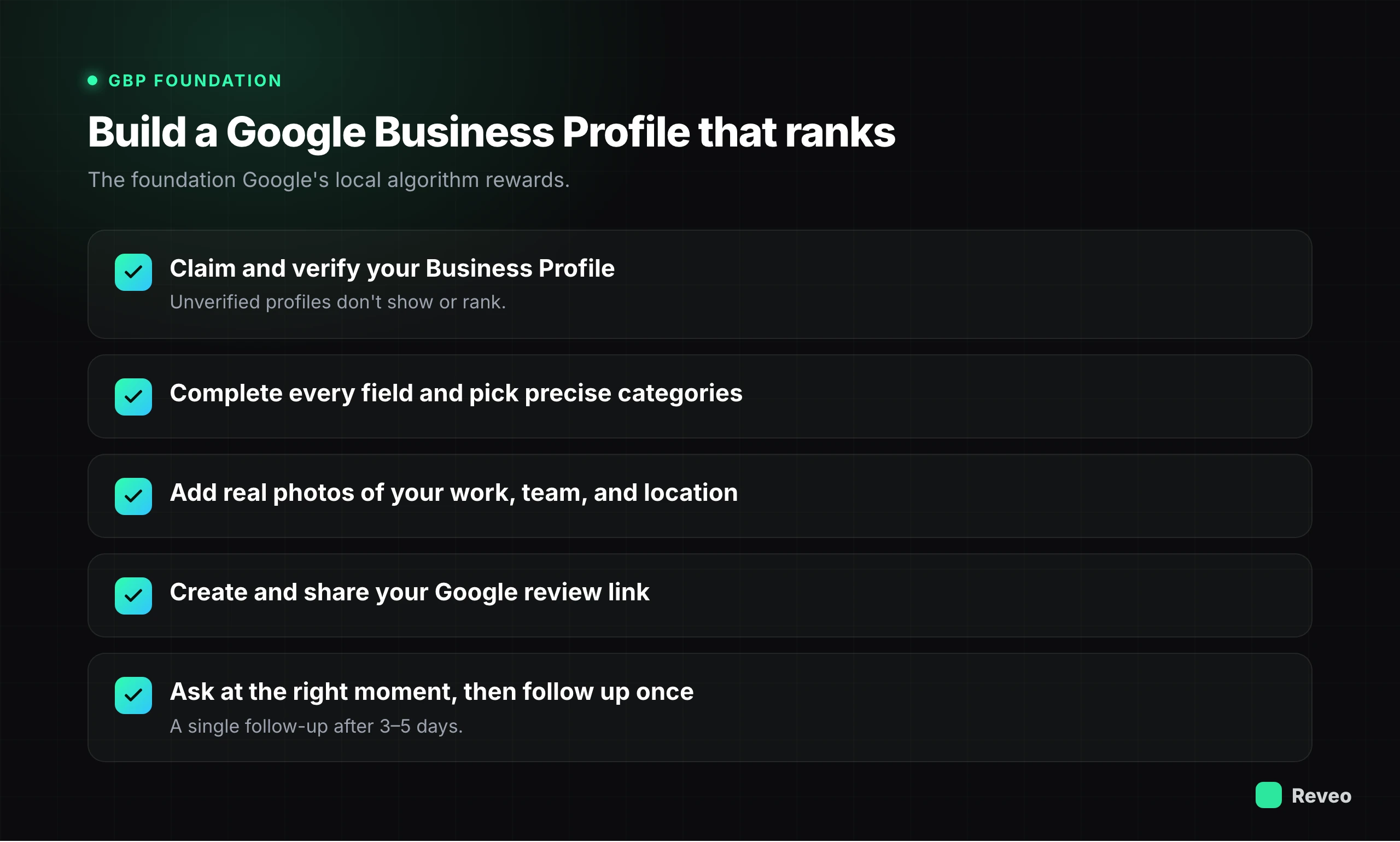
If you haven’t already claimed your Google Business Profile, start at business.google.com. The setup process walks you through entering your business information, selecting categories, and adding your service area.
For a deep dive on GBP optimization — including how to choose categories, write your business description, and add photos that convert — refer to our dedicated GBP Optimization Guide.
Verifying Your Google Business Profile
Verification is essential before your profile can appear in search results or collect reviews. Here’s what verification unlocks:
Full control over the information displayed on your profile
Ability to respond to customer reviews
Access to Google Business Profile Insights and analytics
Ability to post updates, offers, and events
Protection against unauthorized edits to your listing
How to Leave a Google Review
Understanding the customer’s review process helps you create better instructions and remove friction. Here are the two most common methods:
Via Website Browser
- Sign in to your Google account at google.com — 2
Search for the business by name
- Click the “Reviews” tab on the Business Profile — 4
Click “Write a review” and select your star rating
-
Write your review and click “Post” — Via Google Maps App
-
Open the Google Maps app on your phone — 2
Search for the business and tap on its listing
- Scroll down and tap “Reviews” — 4
Tap the star rating to begin your review
- Add your written feedback, optional photos, and tap “Post” — ### Creating Your Google Review Link
A direct review link removes friction and makes it dramatically easier for customers to leave feedback. Here’s how to generate yours:
- Sign in to your Google Business Profile Manager — 2
Navigate to the “Home” tab of your profile
- Find the “Get more reviews” card — 4
Click “Share review form” to copy your unique link
- Use a URL shortener to create a clean, branded link — 6
Share via email, SMS, QR code, or your review management platform
Troubleshooting Missing Reviews
Sometimes reviews disappear or fail to publish. Here are the five most common reasons:
-
Policy Violations — Reviews containing prohibited content (spam, hate speech, conflicts of interest) are automatically filtered by Google’s algorithms.
-
Suspended Profile — If your GBP has been suspended due to guideline violations, all reviews may become hidden until the suspension is resolved.
-
Customer Deletion — Customers can delete their own reviews at any time. If a review disappears, the customer may have removed it themselves.
-
Google Removal — Google periodically removes reviews it deems fake, spammy, or in violation of its policies — even legitimate ones can be caught in these sweeps.
-
Technical Issues — Occasionally, reviews may be delayed by technical glitches in Google’s system. Most appear within 24-48 hours, but some take longer.
If reviews are consistently disappearing, try these resolution steps:
Verify your GBP is in good standing with no active suspensions
Ensure customers are using their real Google accounts (not newly created ones)
Avoid having multiple customers leave reviews from the same IP address or location
Contact Google Business Profile support if the issue persists
Wait 48-72 hours before flagging a review as missing — processing delays are normal
Tips for Getting More Reviews
Collecting reviews consistently requires a system. Here are four proven tactics:
Timing Matters
Ask for reviews when the positive experience is fresh — within 24 hours of service completion. The closer to the experience, the higher the response rate.
Keep It Simple
Provide a direct review link that opens the review form immediately. Every extra click you add reduces completion rates significantly.
Empower Employees
Train your team to ask for reviews as part of the service wrap-up. A personal request from the technician or service provider is the most effective ask.
Use Review Management Tools
Automate the review request process with a platform that sends timed, personalized requests via SMS and email after each job completion.
What to Avoid
Google has strict policies around review collection. Violating these can result in penalties, review removal, or even profile suspension:
-
No Incentives — Never offer discounts, gifts, or payments in exchange for reviews. Google prohibits this.
-
No Review Gating — Don’t filter customers by asking their satisfaction level first. All customers must have equal opportunity to leave reviews.
-
No Employee Reviews — Reviews from employees, business owners, or their family members violate Google’s conflict-of-interest policies.
Review Request Best Practices
When reaching out to customers for reviews, follow these principles:
Personalized Acknowledgment
— Reference the specific service you provided to make the request feel genuine.
Specify the Subject
— Suggest what they might mention (e.g., “your AC installation”) to help them get started.
Keep It Concise
— Your request message should be 2-3 sentences max. Include the direct review link.
No Pressure
— Make it clear the review is optional. Pushy requests backfire and can generate negative reviews.
Tactful Follow-Up
— One follow-up after 3-5 days is appropriate. More than that risks annoying the customer.
Chapter 3: Managing Google Reviews for Better Rankings
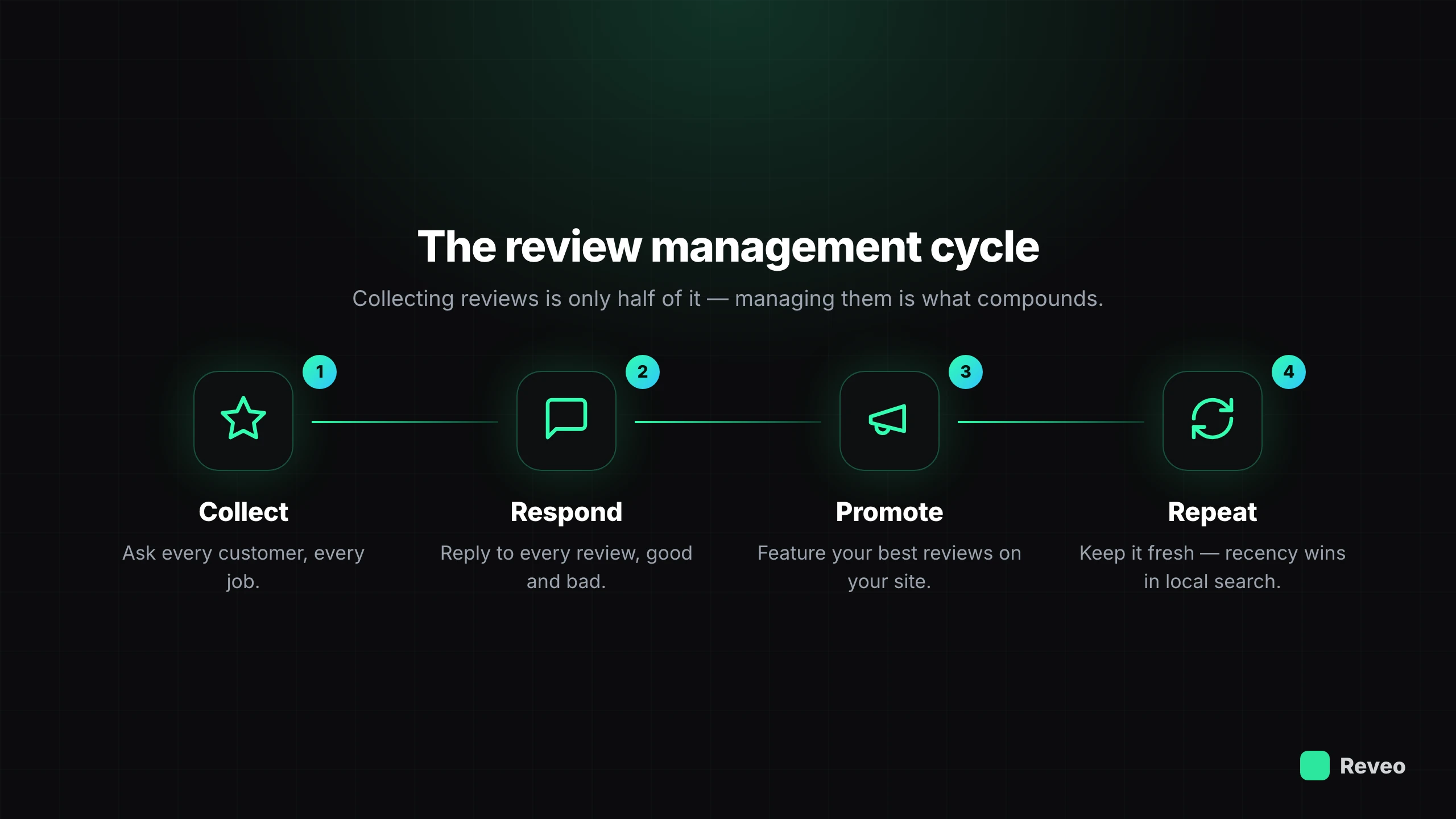
Collecting reviews is only half the equation. How you manage, respond to, and promote your reviews has a direct impact on your search rankings and customer conversion rates.
Why Manage Reviews
Active review management delivers five key benefits:
-
Build Credibility — Responding to reviews shows you value customer feedback and take your reputation seriously.
-
Respond to Feedback — Address concerns promptly and publicly to demonstrate your commitment to service quality.
-
Improve Reputation — Consistent management builds a track record that attracts more positive reviews over time.
-
Boost SEO — Google rewards businesses that engage with reviews. Your responses add keyword-rich content to your profile.
-
Influence Perceptions — Your responses shape how prospective customers perceive your business when they read your reviews.
How to Respond to Reviews
Follow these four steps to respond to any review on your Google Business Profile:
-
Sign in to Google Business Profile — Log into your GBP Manager at business.google.com with your business account.
-
Navigate to Reviews — Click on “Reviews” in the left sidebar to see all customer reviews.
-
Select the Review — Find the review you want to respond to and click “Reply.”
-
Compose Your Reply — Write a thoughtful, professional response and click “Post reply.” Your response will be publicly visible.
Responding to Positive Reviews
Positive reviews are opportunities to reinforce your relationship with the customer and signal your values to future ones:
Express Gratitude
— Thank the customer by name and reference the specific service they mentioned in their review.
Encourage Repeat Business
— Mention you look forward to helping them again or invite them to try another service you offer.
Keep It Concise
— 2-3 sentences is the sweet spot. Long responses to positive reviews can feel over-the-top.
Responding to Negative Reviews
Negative reviews are inevitable, but how you respond to them can actually win you new customers. Research shows that a thoughtful reply to a negative review builds more trust than a perfect 5-star rating with no responses:
Stay Objective
— Acknowledge the customer’s concern without being defensive. Apologize for their experience, not necessarily for being wrong.
Respond Within 24 Hours
— Speed matters. A quick response shows you take customer satisfaction seriously and are actively monitoring feedback.
Take the Conversation Offline
— Provide a direct phone number or email. Resolving issues privately shows professionalism without airing details publicly.
Review Response Best Practices
Follow these do’s and don’ts for every review response:
DO
Respond to every review
Personalize each response
Include relevant keywords naturally
Keep a professional tone
Respond promptly (within 24 hours)
DON’T
- Use generic copy-paste responses — ✗
Get defensive or argumentative
- Ignore negative reviews — ✗
Share customer personal information
- Offer compensation publicly — ### Promoting Your Reviews
Your best reviews should be working for you across every channel. Here are five ways to amplify their impact:
-
Social Media — Share standout reviews as posts or stories on Facebook, Instagram, and LinkedIn with a branded graphic.
-
Email Newsletters — Feature a “review of the month” in your regular email communications to build trust with your subscriber list.
-
Website — Embed a review widget or testimonials section on your homepage, service pages, and landing pages.
-
Marketing Materials — Include your star rating and review count on brochures, flyers, business cards, and vehicle wraps.
-
On-Site Displays — Display review highlights in your office, storefront, or waiting area with printed signage or digital displays.
Deleting Google Reviews
For Customers: You can delete your own review at any time by navigating to your Google Maps contributions, finding the review, and selecting “Delete review.”
For Businesses: You cannot directly delete customer reviews. However, you can flag reviews that violate Google’s policies (fake reviews, spam, or off-topic content) for removal. Google will review the flagged content and decide whether to remove it.
If you suspect a fake review, respond professionally while flagging it:
“Thank you for your feedback. We take all reviews seriously, but we’re unable to find any record of your visit in our system. If you did work with us, please contact our office at [phone number] so we can look into this further. We want to make sure every customer has a great experience.”
Start Boosting Your Rankings With Reviews
Automate review requests and manage your reputation from one dashboard.